Chart Management: Life Events, Family Trees, Clients
Everything you know about a person, kept with their chart: the events of their life, their family, your sessions with them, their pictures and their place in your calendar.
Keep everything you know about a person right alongside their chart. The Chart Management window brings all a native's details into one centralized place. This includes the events of their life, family members, your consultation session notes and reports, photos, associated clients, and relevant calendar dates. You can access this feature from the Charts menu or with a right click on any chart in your list. Chart Management is available exclusively in the Pro and Financial Gold editions.
Life Events
A life event is any significant milestone or occurrence in the native's life, such as a marriage, a relocation, a new job, an illness, or a birth in the family. You can log these events using whatever date information you have available, whether you have the exact time and place or just a general year. You can also assign each event a positive, negative, or neutral valence, a priority level, a detailed description, and link it to the specific relative involved.
- Choose from 48 event types organized into 12 categories, ranging from Relationships and Career to Health and Spirituality, plus the option to create your own custom types.
- Enter dates with whatever precision you have, from exact times down to the minute, to general timeframes like early, middle, or late month, broad years, or even dates before Christ.
- Sort and view your events in your preferred custom order, chronologically by date, or grouped by type, category, valence, or year.
- Easily import events you have already saved to the chart, or paste an entire list of dates and event titles all at once.
- Cast a chart for any event with a single click, viewing it either on its own or alongside the natal chart.
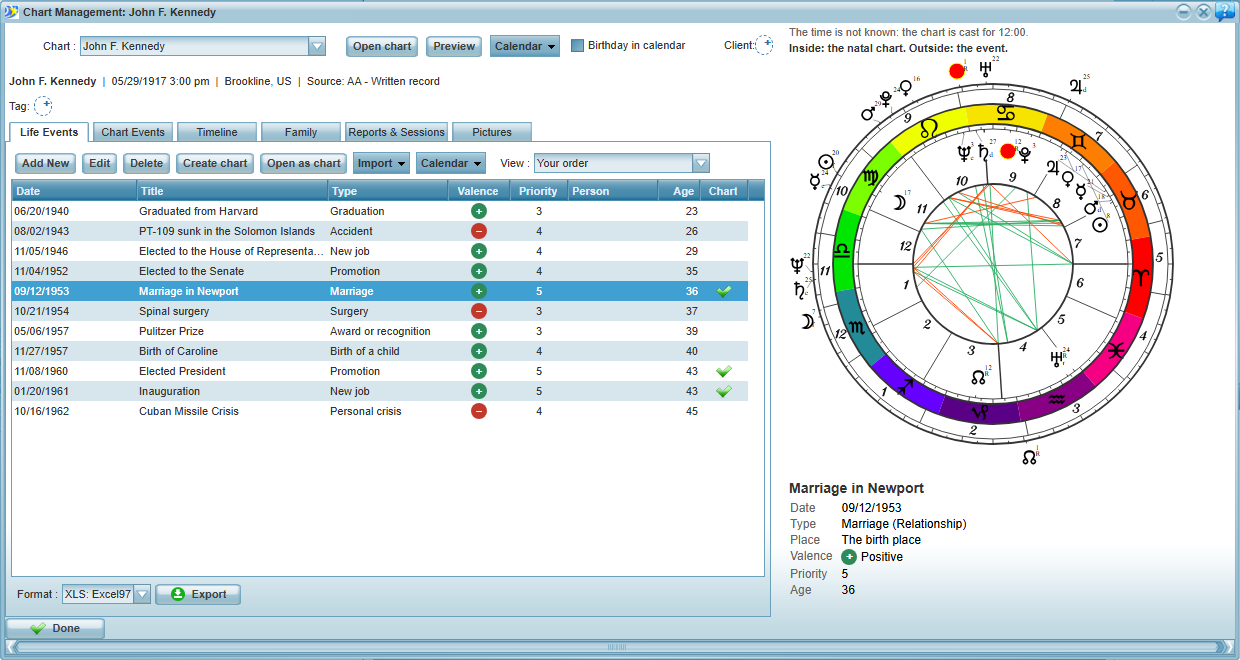
Any events you previously saved with a chart, like specific transits or returns cast for a certain date, are located on the Chart Events tab. From there, you can open each one alongside the natal chart or convert it directly into a life event.
The Timeline
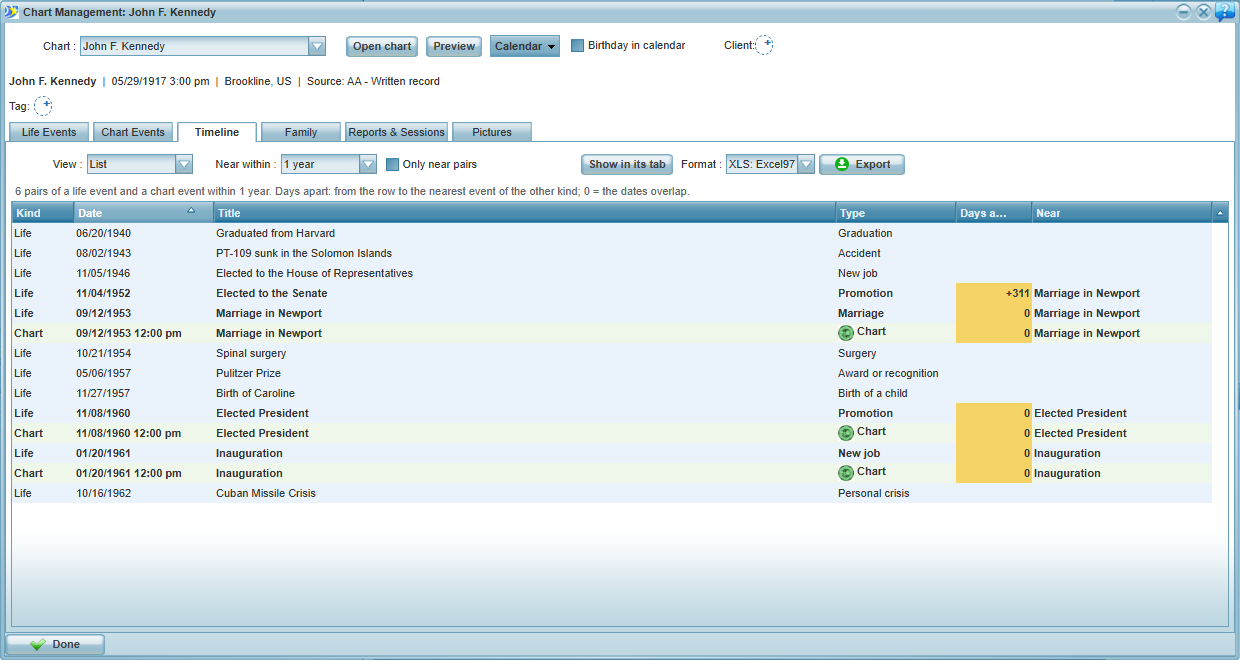
The Timeline organizes both life events and chart events into a single chronological list or a visual display with two separate lanes. You can choose exactly how close two events need to be for a comparison, ranging anywhere from a single day to a full year. Once your timeframe is set, the Timeline highlights which life events coincide with specific chart events and tells you the exact number of days separating them. Among other things, this can be used in the rectification work.
Family Trees
The Family Tree feature is designed for astro-genealogy work. It organizes the relatives of anyone whose chart you are studying, stretching back as many generations as you have on record. Relatives can have their own complete charts, or you can simply enter their name, birth date, time, and location, complete with a Rodden rating to note the reliability of their birth time. Simply click on anyone in the tree to instantly see their exact relationship to your starting person, whether that is a grandmother, a sibling, a cousin, or an uncle.
- Track parents, partners, children, and siblings. This includes detailed options for biological, adoptive, step, and foster parents, along with specific dates for marriages, partnerships, divorces, and separations.
- Add a personal touch by uploading a photo for each person directly from your computer, your phone, or your previously uploaded image library.
- Connect a relative to a chart you have already saved, or generate a brand new chart using the birth data stored right in the tree.
- Select two or more relatives to view them together in a biwheel or a multiwheel. You can also use this selection to easily pull up their synastry aspects, a composite chart, or a Davison chart.
- Whenever you log a birth, a death, or a marriage, the system smartly offers to apply that matching life event to every relative with a chart. For example, adding a new baby will prompt you to add the birth to both parents' life events.
- Build and manage multiple separate family trees, allowing you to keep your personal family organized alongside the families of your clients.
- Save any family tree, complete with a detailed table of its members, as an AstroScribe report linked directly to the chart or as a PDF file.
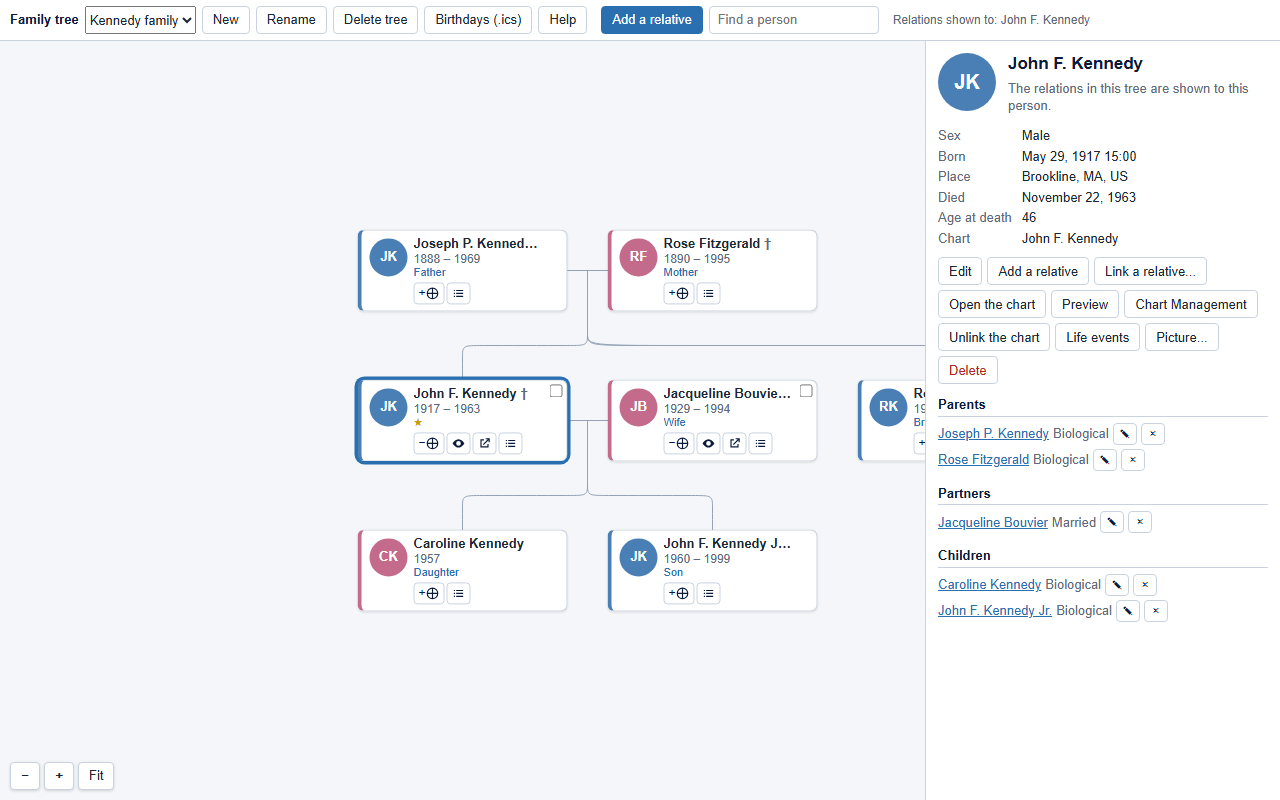
The family tree works on smartphones too, where the view appears split into two mobile-friendly pages.
Reports and Session Transcripts
Any AstroScribe reports you write for a chart can be linked directly to it, making them just a single click away the next time you open that chart. Right alongside your reports, Chart Management also organizes and stores the transcripts from your client consultation sessions.
- Dictate directly in your browser. Just speak, and the words will appear on the screen as you talk, automatically creating a new paragraph every time you take a pause.
- Import captions directly from a Zoom or Microsoft Teams call, or upload any standard subtitle or text file.
- Review a complete transcript that you can easily edit, search, and copy into an AstroScribe report, or choose to save it as its own standalone document.
Rest assured that AstroApp only stores the text of your sessions and never the actual audio. If you want to keep a voice recording, you can simply save it locally to your own computer.
Pictures
You can easily upload photos of the native and link them directly to their chart. You can choose one image to serve as the primary picture, which will display at the top of the Chart Management window and on their individual card within the family tree. You can also select another photo to act as a custom background that appears right behind the astrological wheel every time you open that chart.
Tags and Clients
Tags group your charts the way you think about them: by family, by study, by profession, by anything you like. A chart can carry any number of tags, and you can filter your charts list by a tag or use it in the Advanced Search.
A chart can also belong to one or more of your clients, and you can easily define its relationship to each person. This lets you specify whether it is the client's personal chart or one belonging to their partner, child, parent, sibling, or friend. For instance, you can save a couple's charts under both partners at the same time. Whenever you select a specific client in the Clients window, you will instantly see a complete list of every chart linked to them.
Calendars
You can seamlessly add any life event or birthday to the calendar you already use every day. With just a single click, you can send dates directly to Google Calendar, Yahoo, AOL, Outlook.com, or Office 365. You also have the option to save a date as a file that Apple Calendar, desktop Outlook, and nearly every other calendar program can open. Any birthdays or anniversaries you export will automatically be set to repeat every year.
- Keep track of birthdays for your saved charts, as well as relatives without their own charts, using the internal calendar within AstroApp. You can find this by going to Utilities and selecting Calendar.
- Export all the birthdays from an entire family tree at once as one convenient calendar file.
Frequently Asked Questions
Which editions include Chart Management?
Pro and Financial Gold.
Can I reuse the events I already saved with my existing charts?
Yes. Import them from the chart's saved events, or paste a list with one date and title per line.
Does a relative need a chart to be in the family tree?
No. A relative can have only a name and whatever dates you know. Later, you can create a chart for them directly from the tree, with the birth data already filled in.
Is the audio of my sessions stored?
No. AstroApp keeps the text of a transcript only and never stores the actual audio. If you want to keep the audio recording, you can create and save a copy of the recording to your laptop or phone.
Can I add my clients' birthdays to my Google Calendar?
Yes. A birthday can be added with one click to Google Calendar, Yahoo, AOL, Outlook.com or Office 365, and as a file for any other calendar import.
See Also
- AstroScribe: Reports and Notes taking during Consultations
- Synastry and Composite Charts
- Chart Management, Calendars, Ephemeris, Tools, for the charts database, the Events Manager and the appointments calendar